Artificial Intelligence/ ·18 min read Draft
Building a Field Service Platform with AI
AI /Side Project /Product Design /Field Service
Prologue: What If I Just… Built It?
I’m a product designer. I’ve been doing this for over 15 years. Shaping interfaces, building design systems, defining how complex platforms work. XING, Container xChange, and now Solvares, where I lead product design for a cloud-based field service management platform.
I know how to think about products. How to break down complexity. How to structure information architecture for platforms that serve thousands of users across dozens of workflows.
But I’ve never built one. Not really. Not the full stack. Not the backend, the API, the database, the mobile app. All of it.
That started bothering me.
The Question
I’ve been watching the AI space closely. Not from the sidelines. I’m part of the internal AI group at my company, pushing for adoption across design and product workflows. I’ve been using Claude for months. Writing with it. Thinking with it. Prototyping with it.
And at some point a question started forming that I couldn’t ignore:
What happens if you bring real depth to this?
Not a weekend hack. Not a toy. A real platform, in a domain with genuine complexity. The kind of software that usually requires a team of engineers and months of work.
So I set out to find the answer.
The Setup
I set some ground rules:
- This is an experiment, not a startup. I’m not trying to compete with anyone. I’m not launching a product. I’m exploring what’s possible.
- I bring the thinking, AI brings the execution. I direct the architecture, define the data model, make every product decision. Claude writes the code under my direction.
- No shortcuts on complexity. If field service management needs scheduling algorithms, asset compliance tracking, and a mobile app with offline sync, then that’s what we build.
- Honest documentation. I write down what works and what doesn’t. No cherry-picking the highlights.
I should mention that I wasn’t completely alone. A few people helped during the research phase, scraping documentation and collecting competitive intelligence. And an engineer supported the CI pipeline, automated testing, and a security audit. The product thinking, the architecture, and the AI-directed development were mine. But credit where it’s due.
With that settled, I opened a terminal, started a conversation with Claude, and began.
4 days later, I had a full-stack field service management platform. NestJS API, Next.js dashboard, React Native mobile app, a simulated ERP system, three scheduling algorithms including a constraint optimization engine, 20+ domain modules, real-time sync, and a complete demo environment.
This is the story of how that happened.
What’s Coming
This series is broken into 5 chapters:
Chapter 1: Collecting the Blueprint. How we studied every major field service platform on the market and used Claude to analyze, compare, and synthesize them into a product specification.
Chapter 2: From Zero to Twenty Modules. The first two days of building. Foundation, monorepo, API, web dashboard, and the pace that surprised even me.
Chapter 3: Where It Actually Gets Hard. Scheduling solvers, a constraint optimization engine, a simulated ERP system, real-time sync, and the moments where AI falls apart.
Chapter 4: The Numbers. What came out of 4 days. Every stat, every module, every technical decision. With screenshots.
Chapter 5: What I Learned, What Broke, and What Changed. Honest reflections. What AI is actually good at, where it fails, and how this experiment changed how I think about my career.
This series is written by a designer, not a developer. That’s kind of the whole point.
Chapter 1: Collecting the Blueprint
How we studied every major field service platform on the market and used AI to turn that research into a product specification.
Starting From Curiosity
I design products for a living. I’ve done it across different industries, different company sizes, different levels of complexity. The common thread is always the same: take something messy and make it structured. Take something unclear and make it usable.
Field service management is where I work now. I understand the domain well enough to design within it. But designing screens and understanding every layer of how these platforms actually work are not the same thing.
So before building anything, I needed to go deeper. Much deeper.
The Research Phase
We went through every major field service platform we could find. Not casually. Systematically. Marketing sites, documentation, demo videos, feature lists, pricing pages, help centers.
A few people helped here. Scraping documentation from platforms that don’t make it easy to access. Collecting feature comparisons. Pulling apart demo environments. Synthesizing what we found into structured briefs.
What I was looking for wasn’t a feature list to copy. I was looking for the underlying model. How does this domain actually work? What are the core entities? What are the relationships? What are the workflows every platform shares, and where do they diverge?
Field service software is surprisingly deep. There are scheduling engines with genetic algorithms. Asset compliance systems tracking 29 hazard types. Subcontractor portals with bidirectional XML exchange. Mobile apps that work offline in basements and elevator shafts.
You don’t learn this from a Figma file.
Using Claude as a Research Partner
This is where AI changed the game. Not for coding. For thinking.
I fed Claude everything we’d collected. Documentation. Feature breakdowns. Competitive comparisons. And then I asked it to help me analyze.
What are the universal modules across all platforms? Where do data models agree and where do they diverge? What’s the minimum viable set of entities for a credible system? How do scheduling, work orders, and resource management actually connect?
Claude helped me synthesize all of this into something structured. Not by replacing my thinking. By accelerating it. I still made every decision about what mattered and what didn’t. But the speed at which I could process, compare, and distill was unlike anything I’d experienced before.
What Emerged: The Domain Model
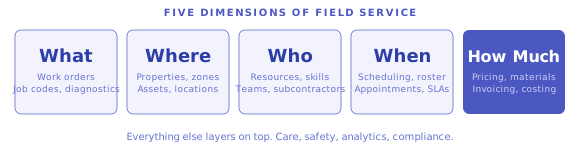
After this research phase, I had a clear picture. Field service management, at its core, is about coordinating work across five dimensions:
- What needs to be done. Work orders, job codes, diagnostics.
- Where it happens. Properties, zones, assets.
- Who does it. Resources, skills, teams, subcontractors.
- When it happens. Scheduling, appointments, rostering.
- How much it costs. Pricing, materials, invoicing.
Everything else layers on top. Care management. Lone worker safety. Analytics. Compliance.
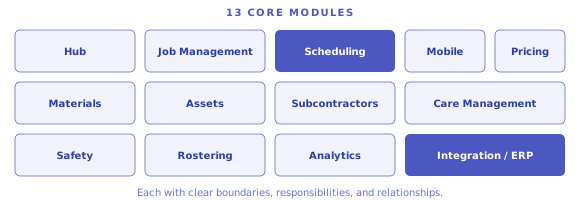
From the research, I mapped 13 core modules that a comprehensive field service platform needs. Hub, job management, scheduling, mobile, materials, pricing, assets, subcontractors, care management, safety, rostering, analytics, and integration. Each with clear boundaries, clear responsibilities, and clear relationships to the others.
I also defined nine user personas. Service desk operators. Field operatives. Schedulers. Supervisors. Asset managers. Care coordinators. Subcontractors. Finance teams. System administrators. Each one interacts with the platform differently.
The Documentation
Before touching code, I wrote documentation. A lot of it.
A platform overview with the full module map, personas, and product vision. An architecture document for the system layers and security model. Detailed data models for every entity and relationship. Module specifications for all 13 modules. Integration patterns for how the platform talks to external systems. A phased build plan. And over 100 user stories across all modules and personas.
In a normal company, this documentation phase would take weeks. With Claude as a research and synthesis partner, it came together in a day.
86 Weeks of Estimated Work
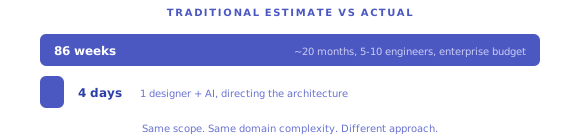
Here’s the thing that hit me when I looked at the build plan.
If you estimated this project traditionally, with a team, with sprint planning, with the normal pace of enterprise software, the phased roadmap came out to roughly 86 weeks. That’s about 20 months of development across 13 phases.
Foundation. Hub. Properties. Job management. Scheduling. Mobile. Materials. Pricing. Assets. Subcontractors. Care management. Analytics. Safety and rostering.
86 weeks.
I was about to try it in 4 days.
Why the Research Mattered
I could have skipped all of this. I could have just started prompting and figured it out as I went.
The result would have been shallow.
What made the next 4 days possible wasn’t AI. It was clarity. I knew exactly what I was building, why each module existed, how the data connected, and what the user workflows looked like. When I started coding with Claude, I wasn’t figuring things out. I was executing a plan.
That’s the part most AI building stories skip. The thinking before the building. The research. The domain immersion. The decisions about what matters.
AI didn’t do that for me. I did. AI just made it faster.
Chapter 2: From Zero to Twenty Modules
The first two days of building. And the moment where the pace stopped making sense.
Getting the Foundation Right
Every complex project lives or dies by its foundation. I spent the first half-day on decisions that would determine everything that followed.
I chose a monorepo. One repository, multiple apps, shared packages. The API, the web dashboard, the mobile app, a shared database layer, and shared TypeScript types. All in one place. When you’re moving this fast, you can’t afford the friction of separate repositories with separate deploys and separate type definitions.
The stack came together quickly. NestJS for the API because it’s structured and modular. Prisma for type-safe database access. Next.js with React for the web dashboard. React Native with Expo for the mobile app. PostgreSQL and Redis running in Docker Compose. Tailwind for styling. Socket.IO for real-time updates. Passport JWT for authentication.
Nothing exotic. Nothing trendy for the sake of it. Every choice was the pragmatic option that would cause the fewest problems downstream.
How I Worked With Claude
This is worth explaining, because it’s not what most people imagine.
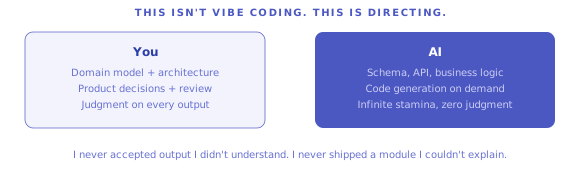
I didn’t say “build me a field service platform.” I worked phase by phase, referencing the documentation I’d written in the research stage. Each module followed the same rhythm. I describe what it needs to do. Claude generates the schema, the API layer, the business logic. I review everything. I reject or revise what doesn’t match my understanding of the domain. We move on.
The key: I was the product lead and the architect. Claude was the engineering team. I never accepted output I didn’t understand. I never shipped a module I couldn’t explain.
This isn’t “vibe coding.” This is directing.
Day 1: The Core
By the end of the first day, the platform had bones.
Authentication with role-based access control. An organization hierarchy, because enterprise software always starts with “who owns what.” Organizations contain contracts. Contracts contain teams. Teams contain work streams. Data scoping that restricts what each user can see based on their role and their position in that hierarchy.
A property register with addresses, coordinates, and geographic zones. Contact management tied to properties.
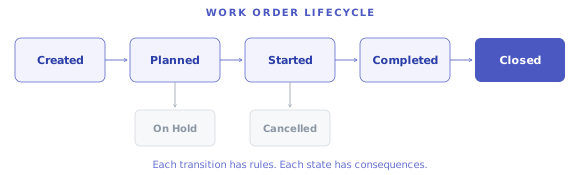
And the big one. The work order lifecycle. This is the heart of any field service platform. An order gets created, planned, started, completed, and financially closed. It can be put on hold. It can be cancelled. Each transition has rules. Each state has consequences. Getting this right matters because everything else in the system connects to it.
Four modules. All interconnected. All with proper API endpoints, validation, error handling. A working foundation.
Day 2: The Avalanche
Day 2 is where things got strange.
It started with the scheduling engine. Resources with skills. A scoring system that figures out which field worker is the best fit for each job. Not just “who’s available” but a weighted evaluation: right skills, right geographic zone, shortest travel distance, manageable workload, familiarity with the property. A dispatch board where schedulers can see and manage everything visually. A map view with all properties and resources plotted geographically.
Then it kept going.
Materials management. Not just a list of parts, but a full supply chain layer. What each operative carries in their van. Warehouse stock levels. Purchase orders. Stock transfers between locations. Auto-replenishment triggers when van stock drops below threshold.
Pricing. And field service pricing is surprisingly complex. Three billing modes: fixed price, job code based rates, and time-and-materials. Rate books that change per contract and per period. Labour costing with overhead and uplift calculations. Invoice generation with all the line items traced back to their source.
Asset management. A full component register where a boiler contains a burner contains a thermostat. Five types of compliance checks: gas, electrical, asbestos, fire, water. Each with expiry dates and jeopardy alerts that flag when something is about to lapse. Programme planning that looks ahead and automatically creates work orders before compliance deadlines hit.
A subcontractor portal. External contractors log in, receive orders, update progress, report on work done, submit variations, and invoice. Their own interface into the same system.
Care management. Referral workflows for health and social care. Care packages. Care plans with recurring visit schedules. Capacity checking plugged into the scheduling engine so you don’t overbook carers.
Analytics. A dashboard builder. Configurable widgets. KPIs pulled from every module. Traffic light indicators. Drill-down into the raw data behind every number.
Safety. Lone worker monitoring with panic alerts and GPS tracking. Shift templates and rostering with working time compliance rules.
And the mobile app. A React Native application where field workers see their daily schedule, navigate to properties, capture work done, and sync everything back in real time.
By the time I looked up, there were over twenty modules.
The Demo
I also built a complete demo environment. A platform nobody can see is a platform nobody cares about.
One button resets the entire database and seeds a full demo dataset. Another logs you in as the demo user. A third triggers the scheduling engine to assign all unplanned work.
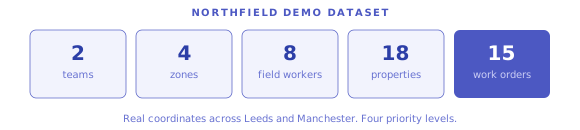
The demo data isn’t random. It’s a fictional housing association called Northfield. Two teams covering north and south regions. Four geographic zones. Eight field workers with different skill sets. Eighteen properties with real coordinates across Leeds and Manchester. Fifteen work orders spanning four priority levels. Emergency, urgent, routine, planned.
Run the scheduler and watch it assign the right people to the right jobs based on skills, location, and availability. That’s when the platform stops being abstract and starts being real.
End of Day 2
Two days in. Around 80 commits. Thirteen build phases complete. Over twenty domain modules. API, web dashboard, mobile app. Authentication, scheduling, materials, pricing, assets, subcontractors, care management, analytics, safety.
The build plan estimated this scope at 86 weeks with a traditional team.
I was two days in. And the interesting part hadn’t even started yet.
Chapter 3: Where It Actually Gets Hard
Scheduling algorithms, a fake enterprise system, real-time sync. And the moments where AI falls apart.
The Easy Part Was Over
Here’s something worth saying plainly: generating CRUD modules with AI is not impressive. Creating, reading, updating, and deleting records is a solved problem. Any competent AI can generate an API endpoint with pagination and validation. It’s useful. It saves time. But it’s not where the real challenge lives.
The real test is what happens when you move past data entry into actual domain logic. Algorithms that solve optimization problems. Systems that simulate entire external platforms. Events that propagate across multiple applications in real time.
Days 3 and 4 were about all of that.
Three Ways to Solve an Impossible Problem
Scheduling is the hardest problem in field service. You have a set of work orders and a set of field workers. You need to match them. Sounds simple until you add constraints.
Does the worker have the right skills? Are they available? Are they in the right geographic zone? How far do they need to travel? How many jobs do they already have today? Have they been to this property before? Is the job urgent or can it wait?
Every time you assign one job, it changes the options for every other job. This is what computer scientists call a constraint satisfaction problem. Finding the perfect solution is computationally impossible at scale. You need smart shortcuts.
I built three different approaches. Each with different trade-offs. And the interesting part is that you can run all three on the same dataset and compare the results.
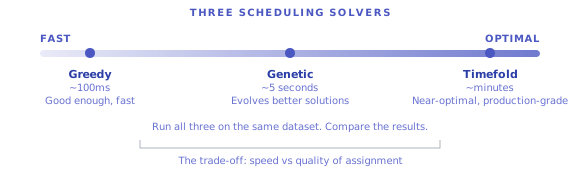
The fast one. It looks at each order one at a time, scores every available worker, and picks the best match. Done in about 100 milliseconds. Good enough when you need a quick answer. But it’s greedy. It can’t see the big picture. Sometimes it assigns a worker to a nearby job and leaves a harder-to-fill job stranded.
The clever one. Inspired by evolution. It generates a whole population of possible schedules, evaluates how good each one is, breeds the best ones together, and mutates them randomly. After a few thousand generations (about 5 seconds), it usually finds a significantly better solution than the fast approach. The trade-off: run it twice, get different results.
The serious one. A proper constraint optimization engine called Timefold. This is operations research software used in logistics, manufacturing, and fleet management. It methodically explores the solution space and finds near-optimal assignments. The kind of tool that large field service companies actually use in production.
The catch: Timefold runs on the JVM. It’s a Java ecosystem tool. My entire platform is TypeScript. So I made an architectural decision. Build the solver as a separate service. A standalone Kotlin application running alongside the TypeScript API, communicating over HTTP.
The web dashboard lets you pick which solver to use from a dropdown. Run all three on the same dataset. See the fast one finish instantly. Watch the clever one iterate for a few seconds. Then let the serious one think for a few minutes and deliver a schedule that’s measurably better.
That comparison view is where you really see the trade-offs come to life.
The Fake Enterprise System
Here’s something most AI-built projects skip entirely: what happens when the platform needs to talk to the outside world?
In real field service deployments, nothing exists in isolation. The platform talks to enterprise systems. SAP, Dynamics 365, Sun Financials. Work orders flow in from ERP. Invoices flow back. Materials get synchronized. Asset data gets exchanged.
You can’t show a field service platform to anyone with real buying authority without showing how it connects to their existing systems. And you can’t test integrations without something to integrate with.
So I built a simulated ERP. Not a mock that returns static JSON. A real application with its own web server, its own database, its own API layer, and its own business logic.
35 database tables covering the full enterprise domain. 65 API endpoints across 10 areas. Authentication. Rate limiting. Pagination. An order state machine that enforces valid transitions. A visit lifecycle that tracks work from booked to completed. A financial engine that handles labour costing, material costing, three billing modes, and variation detection.
The data is synthetic but realistic. Reproducible with the same random seed every time. Fictional postcodes, safe phone number ranges, email addresses that go to example.com. Town names like “Testville” and “Mockchester.” And a production kill switch that prevents it from ever running outside of development.
It sounds like overkill. It’s not. When you demo the main platform pulling work orders from the ERP, synchronizing materials, and pushing invoices back, the whole system suddenly feels credible. Like something that could actually slot into an enterprise environment.
Real-Time: Making It Live
A field service platform needs to feel alive. When a scheduler assigns a job, the field worker’s mobile app should update immediately. When a worker completes a visit, the dashboard should reflect it without anyone pressing refresh.
I built a WebSocket layer inside the API. Every time something changes anywhere in the system, it broadcasts an event. The web dashboard and the mobile app both listen and update automatically.
Open the dispatch board on one screen. Assign a job. Watch the field worker’s mobile view update. A worker marks a visit as complete, the dashboard stats change. No page refresh. No polling. Instant.
Describing it takes a paragraph. Making it reliable takes patience. Reconnection when the network drops. Debouncing when events fire in rapid succession. State reconciliation when a client comes back online after being disconnected. Making sure the mobile app doesn’t flood the API with requests every time an event arrives.
Where AI Struggled
I want to be honest about this. The internet has enough magic narratives.
Architectural decisions. Claude could generate code for any of the three scheduling solvers. But it couldn’t tell me which one to use when, or whether the separate service approach was better than embedding Java inside Node.js. Those calls require understanding deployment constraints, operational complexity, and long-term maintenance.
Cross-service coordination. The Timefold integration required changes in five places at once. The Kotlin solver, the TypeScript API, the database schema, the frontend, and the Docker configuration. AI works well within a single file. Coordinating changes across system boundaries is where it breaks down. I had to orchestrate.
Subtle domain bugs. The financial engine had an edge case where variation flags weren’t set correctly for certain billing configurations. AI generated the code. I caught the bug. Without understanding the business rules behind the calculation, you’d ship it confidently and not realize it was wrong.
Testing. We had end-to-end tests and unit tests, both integrated into the CI pipeline. Pull requests ran the full test suite before merging. But writing reliable tests for things like the constraint solver, where startup times vary and solve durations aren’t predictable, required patience and a kind of systems intuition that AI cannot provide.
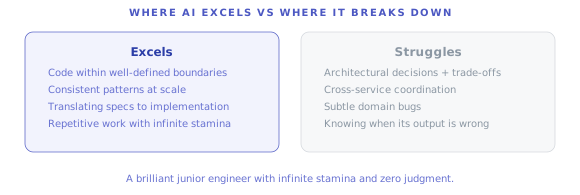
The pattern is consistent: AI excels at generating code within well-defined boundaries. It struggles at the boundaries between systems, at non-obvious edge cases, and at decisions that require weighing trade-offs.
That’s where experience earns its keep.
Chapter 4: The Numbers
Everything that came out of 4 days. No spin.
What Came Out
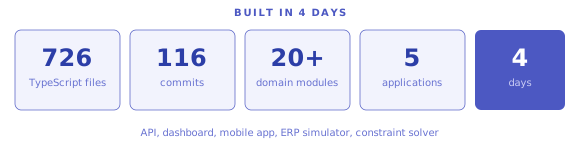
Four days of focused building. One person directing the product, architecture, and AI. A few people supporting research and collection. An engineer helping with CI and testing infrastructure. A security audit on top.
Five applications in a single monorepo:
A REST API built with NestJS, handling authentication, business logic, and real-time events. A web dashboard built with Next.js and React, where dispatchers manage work orders, schedule field workers, and monitor operations. A mobile app built with React Native, where field operatives see their daily schedule and capture work. A simulated ERP system with its own database, 65 API endpoints, and real domain logic. And a constraint optimization solver built in Kotlin, running as a separate service for advanced scheduling.
116 commits. 726 TypeScript source files. Plus Kotlin, SQL, and configuration files on top of that.
What’s Inside
Over 20 domain modules. Not prototypes. Working modules with API endpoints, validation, business logic, and database schemas.
The operational core handles work orders with a full lifecycle state machine, diagnostics, job codes, and resource management with skills, zones, and availability.
Scheduling runs on three different solvers with a comparison view in the dashboard. A dispatch board for manual assignments. A map view for geographic planning. Appointment booking with slot templates.
Financials cover rate books per contract, three billing modes, labour and material costing with overhead calculations, invoice generation, and variation tracking.
Asset management tracks component hierarchies, five compliance types with jeopardy alerts, and programme planning that auto-creates work orders before deadlines hit.
Beyond that: materials and van stock management, a subcontractor portal, care management with referrals and capacity checking, lone worker safety monitoring, shift rostering, and analytics dashboards with configurable widgets.
And the integration layer. The ERP simulator with 35 database tables, 65 endpoints, and its own financial engine.
The Infrastructure
Everything that runs when you start the platform:
A PostgreSQL database. A Redis cache. The NestJS API server. A WebSocket gateway for real-time updates. The ERP simulator with its own SQLite database. Optionally the Timefold solver on the JVM.
All orchestrated with Docker Compose. One command starts everything.
A CI pipeline runs on every pull request. Unit tests and end-to-end tests execute before anything gets merged. A security audit reviewed authentication, role-based access, data scoping, and the overall architecture.
The Demo
Numbers without something you can see are just a spreadsheet.
The demo seeds a fictional housing association called Northfield. Two teams. Four geographic zones. Eight field workers with different skill combinations. Eighteen properties with real coordinates across Leeds and Manchester. Fifteen work orders across four priority levels, from emergency jobs with 4-hour response windows to planned maintenance with 30-day deadlines.
One button resets the database. Another logs you in. A third runs the scheduler and assigns every unplanned job to the best available worker. Watch the assignments appear on the dispatch board and the map. Switch to the mobile view and see the same jobs arrive on a field worker’s daily schedule.
The ERP simulator has its own parallel dataset. 2 organizations, 3 contracts, 50 properties, 15 resources, 40 orders, 60 visits, 30 materials. A complete enterprise backend to integrate with.
What This Scope Normally Requires
The build plan I wrote during the research phase estimated this at 86 weeks across 13 phases. About 20 months with a traditional development team.
The people involved in a typical build like this: 5 to 10 engineers, a product manager or two, a designer, QA. Enterprise timelines with enterprise budgets.
Most of this was built in 4 days. By a designer who had never written a NestJS API before this project.
Where It Stands
Honesty matters more than impressive numbers.
This is not a weekend prototype. It has real architecture, real domain logic, real tests, a CI pipeline, and a security review. The gap between where it is now and a production deployment is real, but it’s not a gulf. It’s the kind of gap a small team could close in weeks, not months.
The foundation is sound. The data model reflects real domain research. The module boundaries are clean. The test coverage is meaningful. The security fundamentals are in place.
What’s missing is the operational layer. Production infrastructure. Monitoring. Logging at scale. The kind of hardening that comes from real users doing unexpected things.
But as a proof of what’s possible, as a demonstration of how far product thinking, domain research, and AI-directed development can take you, the platform speaks for itself.
Chapter 5: What I Learned, What Broke, and What Changed
Honest reflections from a designer who spent 4 days building something that shouldn’t have been possible.
What I Learned
1. AI Doesn’t Replace Expertise. It Multiplies It.
This is the most important thing I took away from this experiment.
What made this work wasn’t the AI. It was what I brought to the conversation. We’d studied every major platform. I’d written detailed specifications. I’d mapped the domain model, the module boundaries, the user workflows. When I directed Claude, I wasn’t guessing. I was executing a plan I understood deeply.
If you bring shallow knowledge, AI amplifies shallow output. If you bring depth, AI amplifies that instead. The tool is a multiplier. A multiplier of zero is still zero.
2. The Bottleneck Is Now Decision-Making
For the first time in my career, I never waited for code. Not once. The code was always available. Instantly, on demand, in any language, for any framework.
What I waited for was my own clarity. Which module should come next? What should the data model look like? Should the constraint solver be a separate service or embedded? What’s the right abstraction for the financial engine?
These decisions were always the bottleneck. Not the implementation.
It means the most valuable skill in this new era isn’t writing code. It’s knowing what the right thing to build is. Product thinking. Domain expertise. Systems design. Judgment.
3. A Designer Who Can Build Changes Everything
I’ve spent 15 years on one side of a line. I design. Someone else builds. I hand off Figma files. Engineers interpret them. Things get lost in translation.
This experiment erased that line.
I went from having an idea to having a working platform with 20+ modules, three scheduling algorithms, and a mobile app. No handoff. No interpretation. No “that’s not what I meant.”
I’m not saying designers should replace engineers. I’m saying the ability to go from concept to working software, even as a proof of concept, fundamentally changes what’s possible for someone with product expertise.
4. Research Is Non-Negotiable
I almost skipped it. I almost just started building.
If I had, the result would have been shallow. A generic app with field service labels on it. The modules would have been wrong. The data model would have been naive. The workflows would have missed critical edge cases.
The time we spent studying every major platform and synthesizing that research with Claude was the single highest-leverage investment of the entire experiment. Everything that followed was execution. That phase was strategy.
If you’re going to build with AI, spend at least 20% of your time on research and planning. It will make the other 80% dramatically better.
What Broke
Token Limits
Claude has a context window. When you’re working on a monorepo with 700+ files, you hit that limit. Hard.
I lost context multiple times. Had to re-explain architecture. Had to re-establish conventions. Had to re-share file contents that Claude had already seen but forgotten.
This was the single biggest practical limitation. The 4 days of building were spread across more calendar time because I kept running out of tokens and had to wait, restart, rebuild context.
Confident Mistakes
Claude never says “I don’t know.” It generates code with complete confidence whether it’s correct or subtly wrong.
A financial engine that handled the common cases perfectly but had an edge case bug in variation detection. A database relation that was technically valid but would cause performance issues at scale. A test that passed in isolation but was unreliable in sequence.
I caught these because I understood the domain well enough to sense when something was off. Someone without that context would have shipped every one of them.
Cross-Service Coordination
AI handles individual files well. When a change needs to ripple across the Kotlin solver, the TypeScript API, the database schema, the React frontend, and the Docker configuration, it falls apart.
You have to orchestrate those changes yourself. Think about the sequence, the dependencies, the interfaces between systems. AI can write the code for each piece. It can’t hold the whole system in its head at once.
Taste
AI generates code that works. But “works” isn’t the same as “right.”
Sometimes Claude would generate a component that did what I asked but was structured in a way that would cause problems later. Tight coupling where there should be separation. Repeated logic where there should be a shared utility. An API response shape that would be awkward to consume on the frontend.
These aren’t bugs. They’re design quality issues. They require an aesthetic sense for how systems should be organized. AI doesn’t have that. You do.
What Changed
How I Think About My Career
Before this experiment, I was a product designer who understood technology well enough to communicate effectively with engineers.
After this experiment, I’m a product designer who can build.
That’s not a small shift. It changes what I can offer. It changes how I approach side projects. It changes the conversations I have. I don’t just have opinions about how something should work. I can show you. Running. In a browser. On a phone.
I’m not becoming an engineer. I’m becoming a designer who doesn’t need to stop at the Figma file.
How I Think About Teams
I used to think shipping a complex product required a large team. Engineers, designers, product managers, QA, DevOps.
This experiment challenged that assumption. Not because AI replaces teams. But because the minimum viable team for a credible product is now dramatically smaller than it used to be.
One person with deep preparation, some targeted support, and AI can produce something that would have required a much larger team and many more months. That changes the economics of software. It changes what’s worth attempting.
How I Think About AI
I’m less impressed and more specific than I was before this experiment.
AI is excellent at generating code within well-defined boundaries. Maintaining consistent patterns. Translating specifications into implementations. Handling the work that takes time but not creativity.
AI is poor at architectural decisions. Cross-system coordination. Catching subtle domain bugs. Knowing when its own output is wrong. Deciding what to build versus how to build it.
The most accurate framing I found: AI is a brilliant junior engineer with infinite stamina and zero judgment. You provide the judgment. It provides the stamina.
What’s Next
I’m not turning this experiment into a product. That was never the point.
But it changed my trajectory. I’m building other things with this approach. Bringing product thinking and domain depth to AI-powered development. Some are side projects. Some might become real products.
The lesson I keep coming back to: the tools are here. The question is what you bring to them.
If you’re a designer, a product manager, a domain expert. Someone who’s always had the ideas but never had the engineering capacity to execute them. This is your moment.
The line between having an opinion and building the thing has never been thinner.
Go be curious.
If you want to follow what I’m building next, find me on LinkedIn or at oleharland.com.